
Profile
A saved preset that says how strong and expensive a role runs - a provider, its model, and the effort level.
In simple words
A Profile decides how strong and expensive a role runs. It is a saved preset bundling three things: where the work happens, which model, and how hard that model thinks.
Think of the drive modes on a car: Eco and Sport change how hard the engine works, not who is driving.
Profiles in the dashboard sidebar holds them, one card each, grouped under the provider they run on. The page header counts them and flags any that have gone unusable:
A role points at a profile, never at a model. That indirection is the point: swap the model for six workers by editing one card.
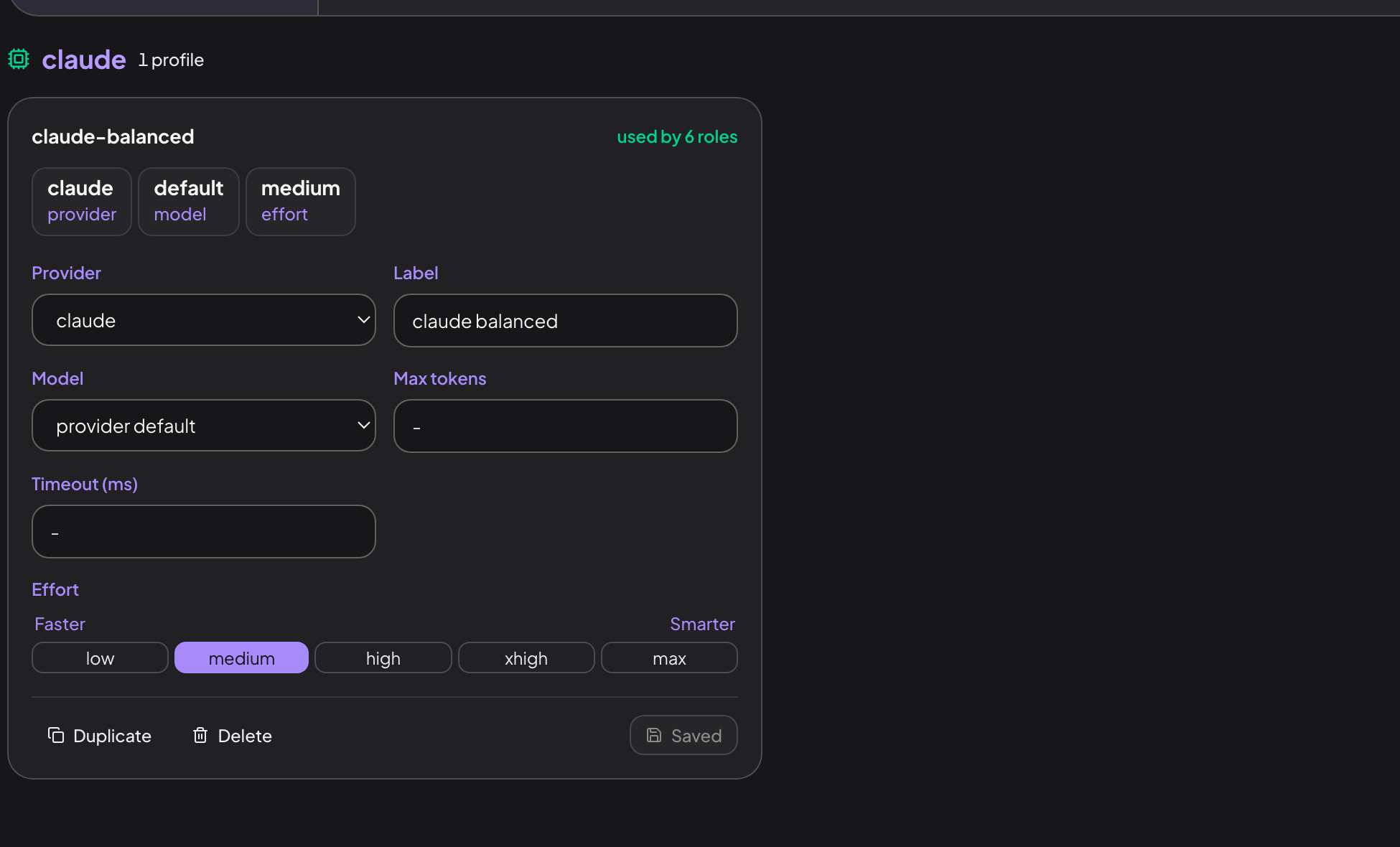
The tiles say what it resolves to today and the fields under them are where you change it. Edit this one card and all six roles run on the new setting from the next run.
The effort scale is the provider’s own, not one Vibestrate invented. claude offers low, medium, high, xhigh and max; codex offers a different five; the Gemini CLI exposes none at all and its cards say so. A provider whose reasoning is a numeric budget rather than a level gets no effort knob, instead of a fake one.
When you would make another
New profile in the page header opens the create form; Duplicate on a card copies an existing one under a new id, and Delete warns you first if a role still points at it.
A cheap one and a strong one
Keep claude-balanced and a claude-cheap, and point the mechanical roles at the cheap one.
Cross-vendor review Make a profile on a second provider and point only the reviewer at it. Now the diff is read by something that did not write it.
A slower, deeper planner
Same provider, effort set to max, pointed only at the planner.
A local one A profile on an Ollama provider, for work that must not leave the machine.
A role card on the Crew page can also mint one: New profile there creates the profile and assigns it to that role in a single step.
Where a profile sits
Two roles can share one profile, and a single role can run on a stronger profile for one step through a step override.
The knobs reach the real provider
A profile’s settings take effect on both CLI and HTTP providers: a CLI provider gets a real flag, an HTTP-API provider the equivalent request-body field. It changes what gets spawned or sent, not only what gets written down.
Each knob appears only where it is wired to something real:
The same rule is why there is no per-profile spend dial. An earlier version had a budget field that nothing read at runtime, so it was removed, and a leftover budget: key in an old project.yml is ignored on load. Spend is controlled where it bites: the per-turn output cap in Max tokens, and a project-level daily cap (vibe budget) that stops or downgrades runs.
What a profile carries
Eight fields, five of which default to null, meaning whatever the provider
does by default. That is why a fresh project runs with almost nothing set.
| Field | What it is |
|---|---|
provider | The provider entry this profile runs on. The one required field. |
label | What the dashboard shows. Defaults to the profile id. |
model | The provider’s own model id. null = its default. |
power | The effort level, provider-specific on purpose. null = the provider exposes none. |
maxTokens | Cap on output tokens for a turn, where the provider supports one. |
timeoutMs | Wall-clock cap for a turn. Unset means no cap. |
disallowedTools | Provider tool names this profile may not use. |
providerOptions | Raw provider-specific options, for what the fields above do not reach. |
The profile is the join. It is the only place a model, an effort level, a token cap and a timeout are named together.
timeoutMs being unset is why an unattended run needs the inactivity watchdog:
with no cap and no watchdog, a provider CLI that wedges holds the run open
forever. See Safety.
Write capability is deliberately absent. It is resolved per turn from the run’s
permission mode, never stored here, so the same role is write-capable in one run
and read-only in the next without editing anything. The shape is
profileConfigSchema in src/agents/profile-schema.ts.
The model must exist at the provider
A profile naming a model its provider does not offer is a run that fails the moment it spawns, so Vibestrate checks the pair on write and keeps checking it, because a model can stop existing without anyone touching the config.
How strict depends on where the list came from:
- From the provider itself. At the start of every run Vibestrate probes the providers that can report their own bundled catalog, which today means
codex debug models --bundled, and caches what comes back. It is an offline read with no network. For a provider on that list the Model field becomes a picker, and saving a model outside it is refused, with the available ids named. - From the built-in list. The curated fallback, which is what every other provider gets. That list goes stale the day a provider ships a model, so a value outside it is allowed and reported as unverified rather than wrong. Refusing here would block every new model on release day.
Such a profile is surfaced, not carried in silence. Its card turns amber and states the fault; the page header counts it and offers Pick a model for that profile, which puts your cursor in the Model field. The Dashboard raises an amber banner naming it too, because the run that would fail has not started yet.
Fencing off a role’s tools
A profile can name provider tools a role may not use, with disallowedTools. The main use is ["Task"] on the write seats of a strict flow: it stops a seat’s agent spinning up nested sub-agents that would schedule work outside the flow’s plan, so what actually ran stays legible.
Neither the page nor vibe profile set writes this one, so add it by hand:
profiles:
  strict-writer:
    provider: claude
    model: opus
    # no nested sub-agent orchestration
disallowedTools: ["Task"]This is about legibility, not a write guard. disallowedTools keeps the flow the single scheduler; it is not what stops a read-only seat from writing (that is the seat’s permission mode). It is also best-effort - it blocks the default sub-agent path, not every possible fan-out. Off by default: with no list, nothing is disallowed.
From the terminal
vibe shell manages the same presets on its [4] Profiles page: e/E cycle effort, m/M the model, n new, d duplicate, x delete, and r re-probes the provider catalog.
The command line is the automation path:
vibe profile list
vibe profile add claude-max --provider claude --model opus --power max
vibe profile set claude-max --power high
vibe profile duplicate claude-max claude-cheap
vibe profile remove claude-cheap

vibe run "task" --profile claude-max
vibe run "task" --step-profile implement=claude-max
--profile applies to every seated step in that run; --step-profile swaps one step and leaves the rest alone.
Over HTTP the page’s own routes are GET/POST /api/profiles, POST /api/profiles/:id/duplicate, PATCH and DELETE /api/profiles/:id, plus GET /api/providers/catalog. Each profile in that list carries usedBy, providerConfigured, and a modelStatus / modelIssue verdict. The catalog feeds the model and effort options, and its sources map says whether each provider’s list came from the provider or from the built-in fallback.
A profile is a block under profiles: in .vibestrate/project.yml, and a role points at one by its id. The annotated crew config lists every field with a comment on what it does.
Next: provider is the tool a profile actually runs on.
